
Update your personal details on PokerStars
How do I update my name on my PokerStars account?
If you haven’t completed registration
If you entered your name incorrectly and haven’t submitted the Real Money form:
- Contact Support with the correct details
- We’ll update your name for you
If you’ve already completed registration
If you notice an error after submitting the form:
- Upload a government-issue ID, such as:
- National ID card
- Passport
- Driver’s license
If your name has legally changed
If your name has changed due to marriage or divorce:
- Provide a marriage or divorce certificate
- The document must show both your previous and current legal name
How do I upload documents?
Desktop
Go to:
Help → Contact Us → Security and Verification → Upload Documents
Mobile and website
Use the Contact Form and follow the upload instructions.
Upload documents via our website or mobile:
How do I update my phone number on PokerStars?
You can register one mobile number per account.
Desktop
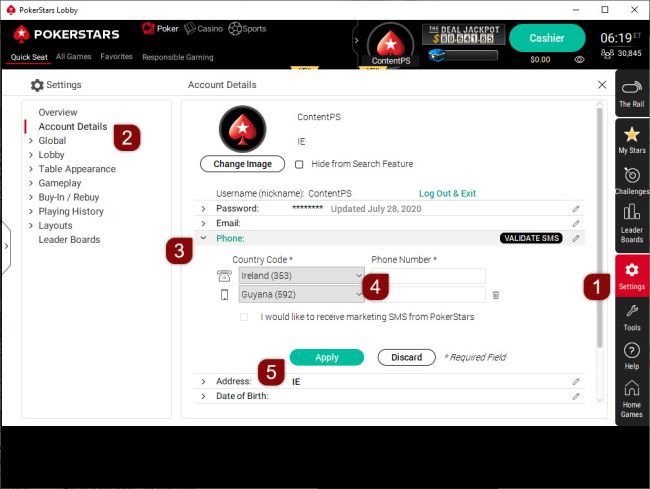
- Go to 'Settings' → 'Account Details' → 'Phone'
- Enter your number (country code is pre-filled)
- Select 'Apply'
Update your phone number on desktop (steps 1–5 shown)
Mobile and website
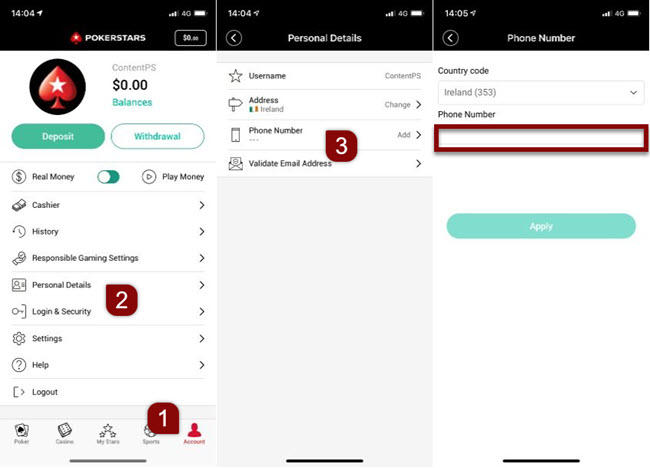
- Log in
- Enter your number in the 'Phone Number' field
- Select 'Apply'
Note: If you receive a minimum length error, add leading zeros.
Upload documents via our mobile or website:

Screenshot on how to update your phone number on mobile (steps 1–3 shown)
How do I update my date of birth on PokerStars?
Entering your date of birth for the first time:
Desktop only:
- Go to 'Settings' → 'Account Details' → 'Date of Birth'
- Enter your date
- Select 'Apply'
Correcting an incorrect date of birth
Contact Support and provide:
- A government-issue ID
- The subject line: Change of date of birth
- A short explanation
How do I update my gender on PokerStars?
- If you haven’t completed registration, contact Support to correct it
- If your gender has changed, provide a government-issue ID with updated details
How do I update my email address on PokerStars?
Desktop
- Go to 'Settings' → 'Account Details' → 'Email'
- Enter your new email
- Select 'Apply'
Watch how to update your email on desktop (video in English)
Mobile and website
- Log in
- Enter your new email
- Enter the verification code sent to your email
If you don’t receive the code, check your spam or junk folder.
Upload documents via our mobile or website:
Watch how to update your email on mobile (video in English)
How do I update my home address on PokerStars?
Contact Support and provide:
- A valid proof of address (clear, full-color copy)
Once verified, your address will be updated and you’ll be notified.
What happens if I move to another country?
Local regulations in your new country will apply.
Depending on the requirements:
- Your account may be migrated
- Or you may need to create a new account
We’ll assist you in both cases.
What documents do I need if I move abroad?
Provide:
- Government-issue ID (name, issue date, date of birth)
- Utility bill (no older than 3 months)
- Bank statement showing activity in your new location
You can upload documents via the software, app, or website.
Important: Mobile screenshots are not accepted for .ES players.
What if I can’t log in?
Contact Support for assistance.